
All of the forms found on the Judiciary’s Forms Page are free to download for anyone wanting to use them. Some of the forms are “fillable,” meaning they can be filled out by typing your information instead of having to print the form and handwrite your information.
Most of the forms that you will need to file bankruptcy are contained in Part I on the Judiciary’s Forms Page and are fillable. To use the fillable option, review the instructions below.
You will need Adobe Acrobat Reader installed on your computer in order to view the Free Forms and use the fillable option. To get a copy of Adobe Acrobat Reader click here.
How to Use the Fillable Forms Option
You should see the following purple bar across the top of the page you are viewing. If you see it then you can type in your information prior to printing the form. If the purple bar is not there, then the form is not fillable and you will need to print the form first then handwrite the requested information.



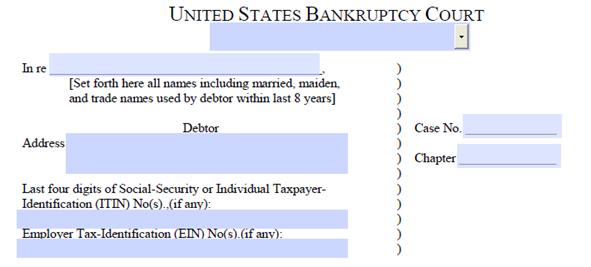
Once you click the Highlight Fields button, all spaces on the page where you can type will turn blue.
Benefits of Using the Fillable Form Option
Using the fillable forms makes it easier to read the information you typed versus if you had handwritten the information.
- It allows the Court, Trustees, and other parties to be able to easily read the documents you have submitted for filing.
- Fillable forms also allow you to save the documents to a disk or drive if you choose. If you misplace your records and have to request copies from the Court, you will be required to pay a fee.
- The forms are always the most current and are FREE. When you pay for forms from other sources, such as office supply stores, the Court cannot guarantee that the forms are up to date. All of the forms found on the Court’s Websites are always the most current form available at no cost to you.